Top Features to Look for in the Best PvP Texture Pack
Choosing the best PvP texture pack depends on your specific combat discipline: PVP Ultra Dark is the top choice for Crystal PvP, Kakarot’s Ultimate PvP leads for PotPvP and sword duels on Java Edition, and Brilliant PvP and the Ultimate PvP Pack offer the best competitive optimization for Bedrock Edition. Specialized PvP packs replace distracting vanilla textures with streamlined, functional assets to maximize spatial awareness and maintain steady frame rates.
When evaluating competitive resource packs, prioritize packs that include these core features:
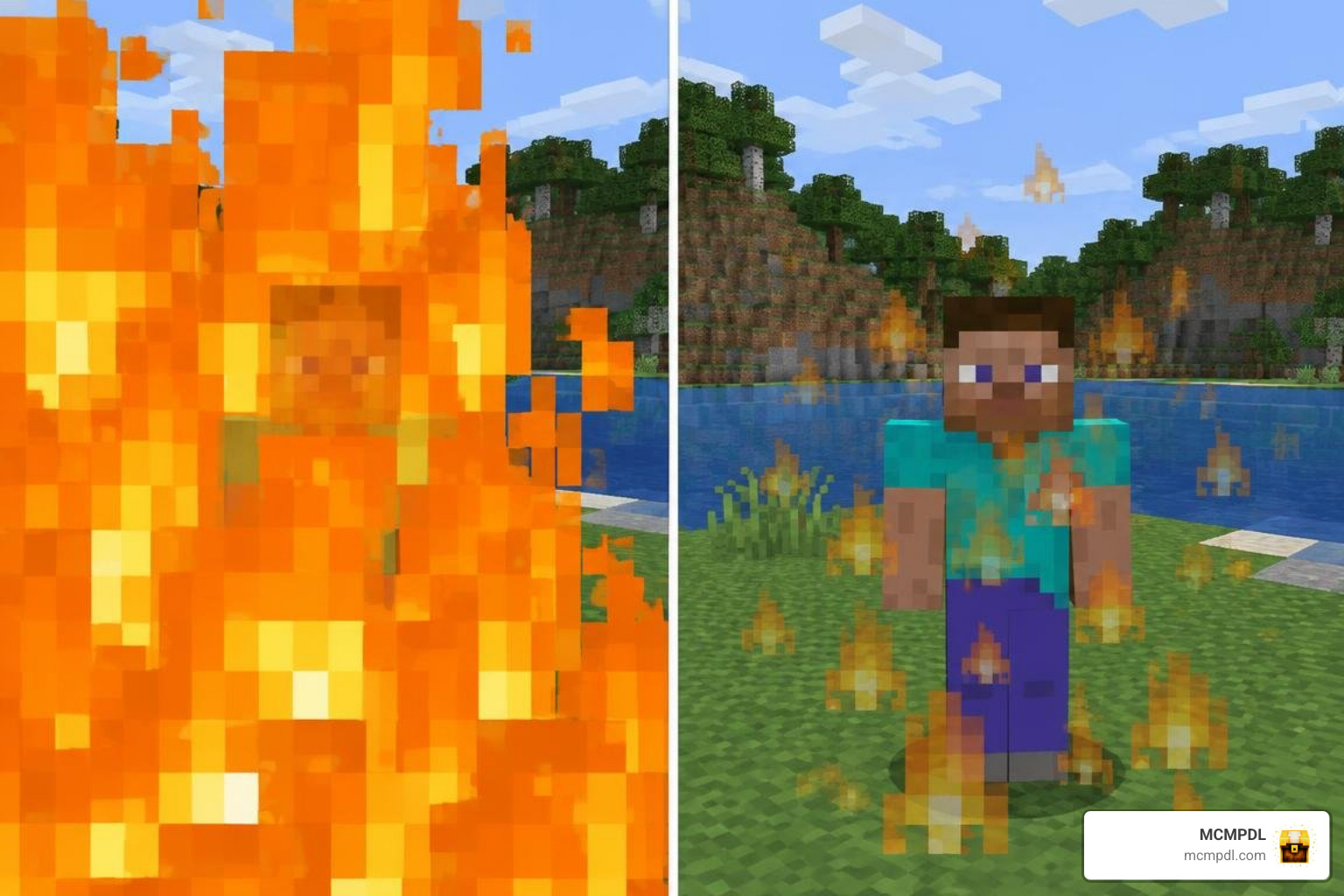
- Low Fire and Minimal Shield Profiles: Default fire blocks over half your screen when ignited. Low fire textures reduce flame height to the bottom edge of your display, while lowered shield models keep your crosshair unobstructed while blocking.
- Short Weapon Models: Traditional swords and axes take up valuable screen real estate. Short swords let you see opponent footwork and sudden movement changes clearly.
- Transparent and Clean UI Containers: Semi-transparent inventory screens, chests, and crafting menus let you monitor your surroundings during quick mid-fight inventory adjustments.
- Particle Density Reduction: Explosions, potion swirls, and block-breaking particles cause visual noise that can tank frame rates during intense clashes. Optimized packs cull unnecessary particles so you can track movement trajectories easily.
- Small Totem Pop Animations: The default Totem of Undying animation blankets your entire display. A scaled-down totem animation preserves your sightline when surviving fatal hits.
- Highlighted Ores and Outlined Cobwebs: Outlined cobwebs prevent accidental entrapment during close-quarters combat, while highlighted mineral blocks make gear hunting faster in Ultra Hardcore (UHC) scenarios.
Top PvP Texture Packs for Minecraft 1.21 Ranked and Compared
To help you find the right fit for your combat discipline, we analyzed resolution metrics, file sizes, engine compatibility, and core gameplay strengths across the top competitive options.
| Texture Pack | Edition | Resolution | File Size | Primary Specialty | Key Advantage |
|---|---|---|---|---|---|
| PVP Ultra Dark | Java 1.21 | 16x | 180.3 MB | Crystal PvP | Dark palette, explosion reduction |
| Scorp’s Vanilla CPVP | Bedrock / Java | 16x | Lightweight | Crystal / Anarchy | 1/4 fire height, small totem pop |
| Kakarot’s Ultimate PvP | Java 1.21 | 16x | 14.0 MB | Sword / Nodebuff | Cyan color scheme, clean crosshairs |
| PVP Essentials Green V.2.1 | Java 1.21 | 16x | 19.1 MB | UHC / Standard PvP | Cobweb outlines, blue Ancient Debris |
| CPVP Essentials V22 | Java 1.21 | 16x | Modular | End Crystal Combat | Anchor tracking, crystal visibility |
| Brilliant PvP | Bedrock Edition | 16x | Lightweight | Universal Bedrock | Mobile optimization, durability HUD |
| Ultimate PvP Pack | Bedrock Edition | 16x | Lightweight | Bedrock Arenas | Clear water, short weapons, low fire |
PVP Ultra Dark: Best PvP Texture Pack for Low Visual Clutter
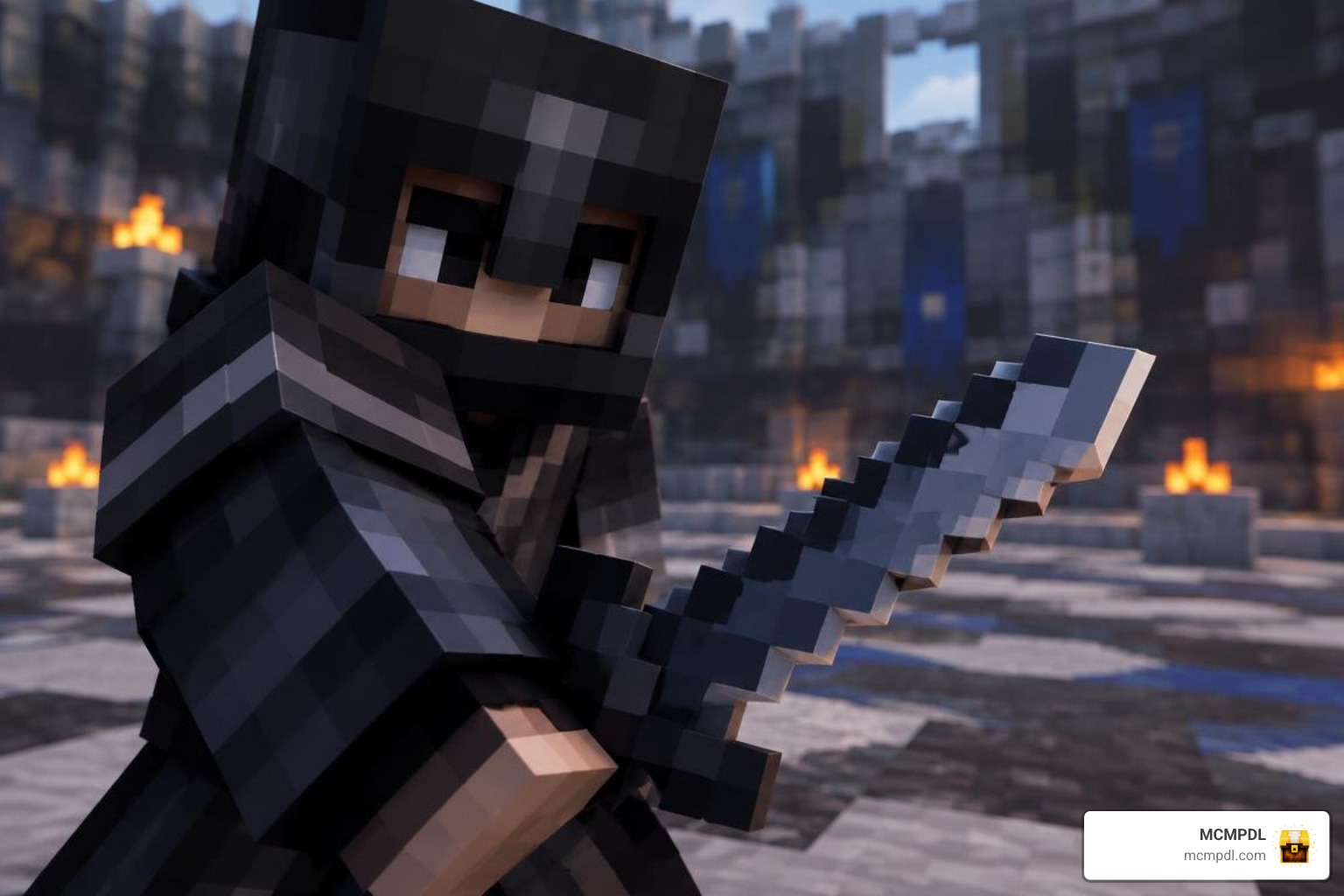
PVP Ultra Dark 16x Texture Pack for Minecraft 1.21 provides a sleek, dark-themed visual overhaul built directly for Minecraft 1.21 Java Edition. Designed specifically around the chaotic demands of Crystal PvP, this pack swaps out distracting bright flashes and noisy blast patterns for subdued, clean explosion graphics.
At 180.3 MB, it delivers comprehensive coverage across all combat blocks, gear sets, and utility items. Because it relies on a standard 16x resolution baseline, texture loading remains lightweight on your graphics hardware, helping you maintain consistent frame pacing during rapid crystal placements and anchor detonations.
Scorp’s Vanilla CPVP Pack
With over 8,900 downloads, Scorp’s Vanilla CPVP Pack is a favorite among competitive fighters and anarchy server veterans. This pack aggressively strips away visual clutter by introducing 1/4-pixel-tall fire, lowered shield blocking stances, and downscaled item models across the board.
During heated crystal duels, standard totem animations can completely blind you to incoming respawn anchor charges. Scorp’s CPVP pack shrinks the totem pop down to a subtle corner notification, giving you total visibility over your opponent’s next move while reducing particle-related input lag.
Kakarot’s Ultimate PvP Pack
If you prefer crisp sword duels and responsive PotPvP/Nodebuff gameplay, Kakarot’s Ultimate Pvp Pack delivers an exceptionally lightweight 14.0 MB install. Featuring a distinct cyan palette, this 16x pack provides clean crosshairs, shortened blade profiles, and distinct armor trimming for fast enemy recognition.
Because it matches vanilla resolution limits, Kakarot’s pack does not create heavy GPU overhead, allowing players on budget gaming rigs or older laptops to enjoy steady, competitive frame rates on modern Minecraft 1.21 servers.
PVP Essentials Pack Green V.2.1
Created by Jitti, PVP Essentials Pack Green V.2.1 brings targeted tactical advantages across its 19.1 MB footprint. Tailored for UHC matches and traditional sword arenas, it outlines tricky cobweb blocks so you never get trapped during pursuit maneuvers.
The pack removes block-break particles, tints Ancient Debris blue for rapid mining identification, and refines stone, deepslate, and glowstone for clean contrast. Combined with smaller totems and compact held items, it keeps your screen clear of visual noise throughout prolonged team fights.
CPVP Essentials V22
CPVP Essentials V22 is engineered for deep mechanical utility in high-tier crystal combat. Rather than purely altering artistic styles, this pack enhances the distinct visual boundaries of End Crystals, Obsidian blocks, and Respawn Anchors.
By emphasizing hitbox visibility and streamlining blast animations, CPVP Essentials allows you to calculate placement timing and double-pops with pinpoint accuracy.
Brilliant PvP Texture Pack for Bedrock Edition
Optimized directly for mobile, console, and Windows Bedrock players, the Brilliant PVP Texture Pack features high-visibility interface modifications and smooth rendering pipelines. It introduces clean armor durability status indicators and vibrant UI containers designed specifically for touch and controller navigation.
The pack scales down bulky held items and eliminates unnecessary particle overhead, making it one of our top recommendations for cross-platform Bedrock server tournaments.
Ultimate PvP Pack
The Ultimate PVP Pack Texture Pack serves as a complete all-in-one resource pack for Bedrock Edition combat. It combines essential competitive adjustments into a single install, including crystal-clear water textures, low fire overlays, custom short swords, and high-visibility projectile paths.
Whether you are grinding Bedrock SkyWars, BedWars, or open-world faction warfare, this pack balances visual appeal with smooth performance across all supported devices.
16x vs Higher Resolution: Performance and FPS Optimization
One of the most common debates in competitive Minecraft centers on resolution: should you choose standard 16x textures or step up to 32x, 64x, or higher packs?
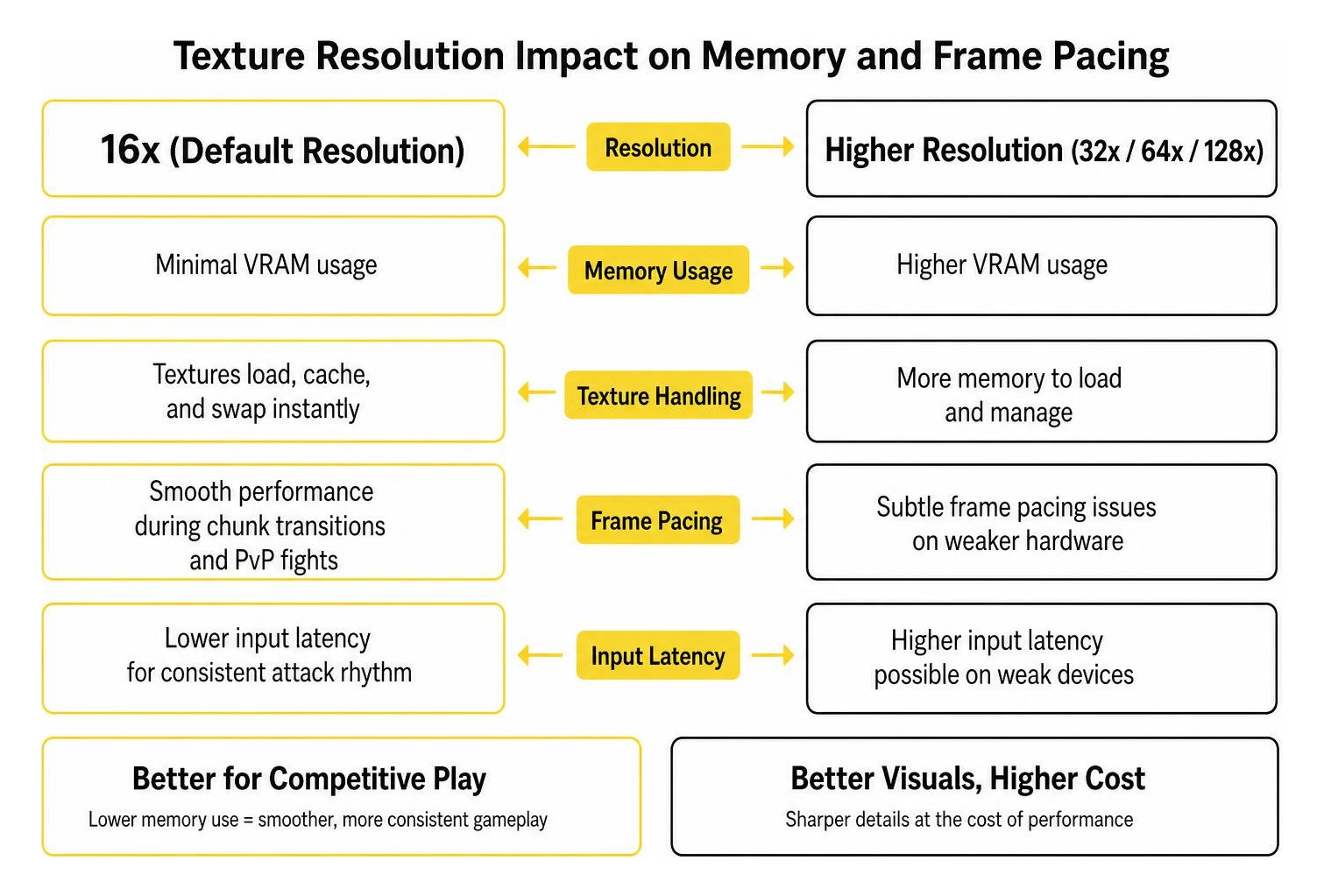
16x texture packs match the default resolution used by vanilla Minecraft, as detailed on the Minecraft Wiki’s resource pack page. Because these assets require minimal VRAM, your graphics card can load, cache, and swap textures instantly. This low memory footprint prevents micro-stutters during rapid chunk transitions and chaotic multi-player skirmishes.
Higher resolution packs (32x, 64x, or 128x) deliver sharper edges and smoother gradient work on sword blades and armor models. However, that visual clarity comes at the cost of higher memory consumption. On entry-level hardware, integrated GPUs, or mobile Bedrock devices, high-resolution textures can introduce subtle frame pacing issues and minor input latency—two factors that can easily disrupt your attack rhythm. For purely competitive gameplay, 16x remains the tournament gold standard.
How to Install and Customize PvP Resource Packs in Minecraft 1.21
Installing PvP packs takes just a few moments across both major editions of the game:
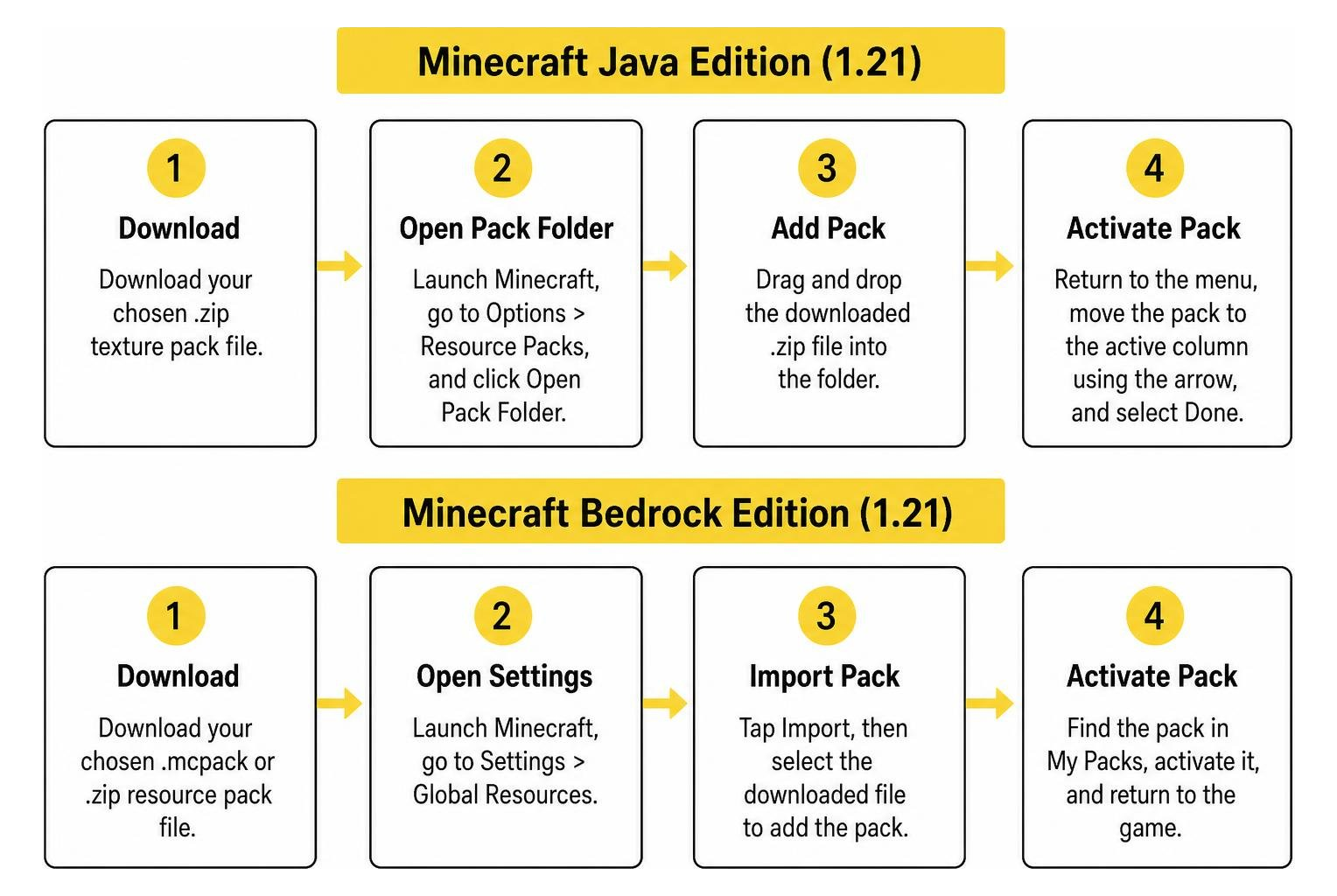
For Minecraft Java Edition (1.21):
- Download your chosen
.ziptexture pack file. - Launch Minecraft, navigate to Options > Resource Packs, and click Open Pack Folder.
- Drag and drop the downloaded
.zipfile into the folder. - Return to the in-game menu, hover over the pack in the left column, click the arrow to move it to the active right column, and select Done.
For Minecraft Bedrock Edition:
- Download the
.mcpackfile from our curated repository. - Double-click or tap the file; Minecraft Bedrock will open automatically and import the resource pack.
- Open Settings > Global Resources, click My Packs, locate your download, and hit Activate.
(Tip: If you want custom color accents, several modern pack platforms offer web-based designer tools to help you swap hue palettes before downloading!)
Frequently Asked Questions About PvP Texture Packs
Which is the Best PvP Texture Pack for Low-End Systems?
For budget setups, lightweight 16x packs like Kakarot’s Ultimate PvP Pack or Scorp’s Vanilla CPVP Pack provide optimal stability. They remove unnecessary particle rendering and maintain vanilla-grade texture sizes to keep frame rates consistent.
Do PvP Texture Packs Give an Unfair Advantage on Multiplayer Servers?
No. Standard PvP texture packs only modify client-side visual aesthetics such as item models, fire height, and UI transparency. Because they do not alter server hitboxes, player reach, or movement mechanics, they are permitted across major competitive servers.
Do You Need OptiFine or Mods to Run PvP Texture Packs in 1.21?
Most 1.21 PvP resource packs run on completely unmodified vanilla clients. However, pairing your pack with modern performance optimization mods (like Sodium/Iris on Java Edition) will unlock custom skyboxes and provide even smoother frame rates.
Conclusion
Upgrading to a dedicated PvP texture pack eliminates visual distractions, stabilizes your frame rates, and gives you clean line-of-sight during high-intensity combat. Whether you specialize in explosive Crystal PvP or Bedrock arena duels, the right pack keeps your attention focused on landing your hits.
Ready to gain the competitive edge on Bedrock Edition? You can explore the Ultimate PVP Pack Texture Pack and discover hundreds of other tested, community-favorite downloads in our curated collection at MCMPDL today!
1 thought on “10 Best PvP Texture Packs for Cleaner Hits and Better Visibility”