Scroll down to D0vvnl0ad
Get Elytra Expansion Ready for Bedrock Flight

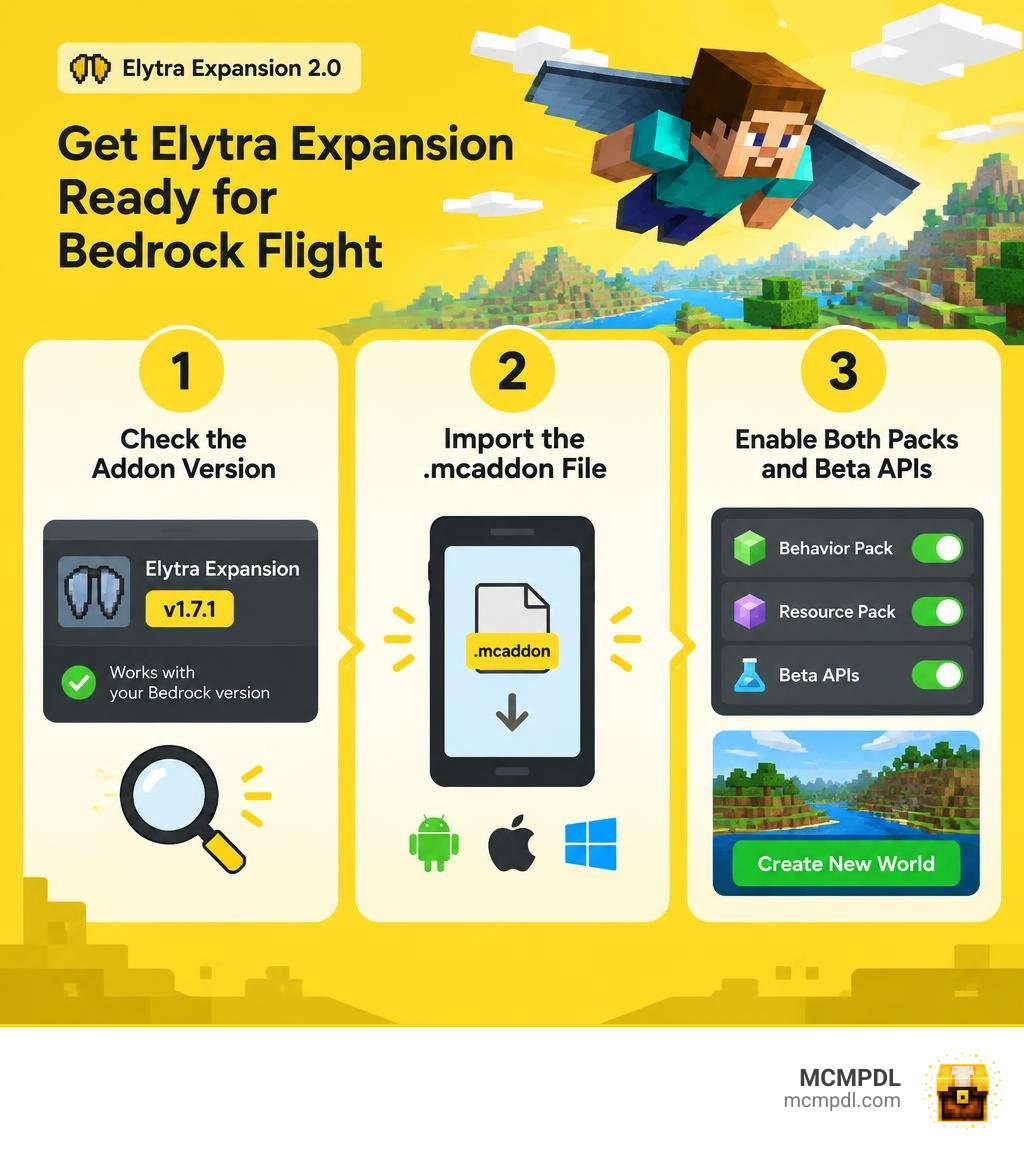
To install the Elytra Expansion 2.0 Addon for Minecraft PE/Bedrock, first check the file version and your Bedrock version. Then import the .mcaddon file on Android, iOS, or Windows. Finally, activate both its Behavior Pack and Resource Pack, turn on Beta APIs in your world settings, and test it in a new world.
Check the version label before you download: the available Elytra Expansion listing identifies its main file as v1.7.1, not 2.0. Elytra Expansion adds a cockpit display, weapons, flares, and dive bombs to elytra flight. It is different from Armored Elytra 2.0, which focuses on combining flight with chestplate protection.
What Is the Elytra Expansion 2.0 Addon for Minecraft PE/Bedrock?
How Elytra Expansion 2.0 Addon for Minecraft PE/Bedrock changes elytra flight
Vanilla elytra flight is wonderful for exploring biomes and traveling across massive worlds, but it is strictly passive gliding. The Elytra Expansion addon completely revamps this dynamic by turning your elytra into an agile, armed combat aircraft.
Once equipped, the addon overlays a tactical cockpit Heads-Up Display (HUD) directly on your screen. This HUD tracks your live air speed, current altitude, compass heading, active weapon mode, and reserve ammunition levels. Instead of relying only on firework rockets to maintain momentum, the pack transforms your nine hotbar slots into an organized flight cockpit. You gain dedicated slots for cannons, homing missiles, defensive flares, bomb bays, rapid-fire machine guns, and sustained fuel boosters.
| Feature Category | Vanilla Minecraft Elytra | Elytra Expansion Addon |
|---|---|---|
| Flight Dynamics | Passive gliding propelled by firework rockets | Sustained flight via boosters and auto-boost systems |
| Combat Capability | Basic handheld weapons (bows, tridents, swords) | Integrated cannons, flak, machine guns, missiles, and bombs |
| Cockpit Interface | Standard vanilla crosshair and hotbar | Full combat HUD with speed, altitude, heading, and ammo |
| Defensive Countermeasures | None | Deployable thermal flares to break incoming missile locks |
| World Setup | Standard vanilla world | Requires Behavior Pack, Resource Pack, and Beta APIs |
What “2.0” means—and which addon it refers to
When players search for the Elytra Expansion 2.0 Addon for Minecraft PE/Bedrock, there is often confusion regarding two distinct flight addons available within the Bedrock community:
- Elytra Expansion (Main File v1.7.1): This is the combat-heavy aircraft addon that features machine guns, homing missiles, heavy dive-bomb bays, and a functional HUD. As of November 2026, its active project file is packaged as
Elytra_Expansion_v1.7.1.mcaddon, supporting Bedrock engine releases around 1.21.60+ and listed game versions 26.50 and 26.60. - Armored Elytra 2.0 / 2.0.1: This separate utility addon solves the age-old dilemma of choosing between flight and protection. It allows players to fuse standard elytra wings with Chainmail, Iron, Gold, Diamond, or Netherite chestplates on a crafting table. Version 2.0 introduced a pure scripting system that preserves enchantments like Protection, Thorns, Unbreaking, and Mending while dynamically swapping item modes during jumps.
If your primary goal is aerial dogfighting, strafing hostile mobs, and dropping cluster bombs, you want the combat-focused Elytra Expansion pack. If your goal is simply wearing Netherite armor while gliding, you want the Armored Elytra utility.
How to Download and Install Elytra Expansion in 3 Simple Steps
Step 1: Check requirements for Elytra Expansion 2.0 Addon for Minecraft PE/Bedrock
Before installing the addon, ensure your device and Minecraft client meet all technical requirements:
- Platform: Minecraft Bedrock Edition (compatible with Android, iOS, Windows 10/11, and supported consoles). This addon is not designed for Java Edition.
- Engine Version: Bedrock engine ballpark 1.21.60 or newer (including versions 26.50 and 26.60).
- File Pairing: Both the Behavior Pack (BP) and Resource Pack (RP) must be downloaded together. Running one without the other will cause broken scripts and missing textures.
- Experimental Toggles: The world must have the Beta APIs experiment toggled on to execute the custom flight mechanics and HUD logic.
Step 2: Import the addon and activate both packs
Importing .mcaddon files into Minecraft Bedrock is straightforward across modern platforms:
- Download the File: Save the
.mcaddonfile to your device storage. - Open with Minecraft: On Windows, double-click the downloaded file. On Android or iOS, tap the file in your file manager and select Minecraft from the “Open With” prompt to initiate the automatic import.
- Create or Edit a World: Navigate to the world settings menu for a new or existing test world.
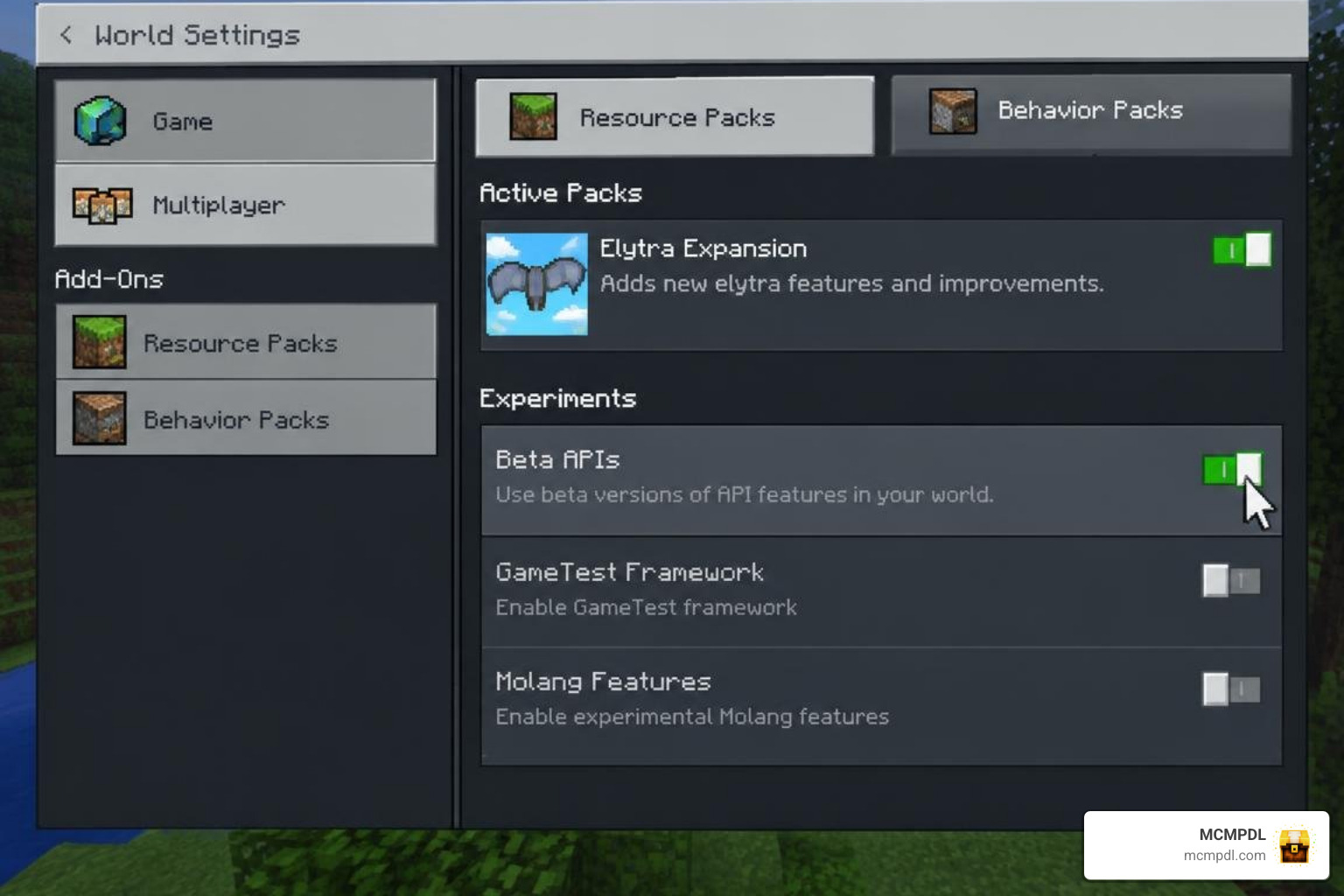
- Activate Behavior and Resource Packs: Go to Resource Packs and activate the Elytra Expansion pack. Next, go to Behavior Packs and activate the corresponding Elytra Expansion behavior pack.
- Enable Beta APIs: Scroll down to the Experiments tab and turn on Beta APIs. Accept the experimental gameplay prompt.
Step 3: Verify the download and launch the game
Once inside your test world, verify that the installation succeeded:
- Enter survival or creative mode and equip a standard pair of elytra wings.
- Jump from an elevated ledge or deploy a firework to engage flight.
- Check if the tactical flight HUD renders on your screen showing your altitude, speed, and heading.
- Open the text chat window and type
/ee:helpto view the in-game command directory, or type/ee:settingsto adjust your HUD interface preferences. - If the HUD does not appear or flight triggers do not register, exit the world, verify that both the Behavior and Resource packs are active, and ensure the Beta APIs toggle is switched on.
Weapons, Dive Bombing, Controls, and Survival Progression
The addon seamlessly integrates with standard flight mechanics outlined in the official Elytra – Minecraft Wiki, while expanding your arsenal with specialized combat tools.
Controls in Elytra Expansion 2.0 Addon for Minecraft PE/Bedrock
Piloting your combat elytra relies on a responsive, intuitive control loop:
- Fire / Drop (Right-Click / Use): Engages the weapon, booster, or flare assigned to your active hotbar slot while airborne.
- Mode Swap (Sneak-Tap): Tapping the sneak button toggles sub-modes on specific weapon slots (such as swapping between ground salvo and target tracking on missile slot 2, or cycling bomb types on slot 8).
- Aiming Cam (Hold Sneak): Holding sneak engages a stabilized aiming camera, ideal for dogfights or high-precision strafing runs.
- Reload (Press Q): Pressing the drop-item key reloads your active weapon from your reserve inventory.
- Configuration Commands: Use
/ee:helpfor a complete command overview and/ee:settingsto personalize visual HUD elements.
Dive bombing and the six bomb types
Dive bombing represents the core personality of the Elytra Expansion pack. When you pitch your nose downward into a steep vertical dive, the system automatically activates a downward-facing bomb camera accompanied by an atmospheric Jericho-trumpet-style acoustic siren.
While lining up your target, tap sneak to cycle between six distinct bomb payloads before releasing with right-click:
- HE (High Explosive): Standard all-purpose blast for clearing enemy ground forces.
- AP (Armor Piercing): Concentrated kinetic force engineered to crack heavily fortified structures.
- Carpet: Releases a string of rapid detonations across wide corridors.
- Incendiary: Ignites wide patches of terrain to deny ground access.
- Cluster: Splits mid-air into sub-munitions for sweeping area saturation.
- MEGA: Massive high-yield ordnance designed for ultimate destruction.
Hotbar weapons, equipment, and survival unlocks
The addon assigns your nine hotbar slots to dedicated flight equipment:
- Slot 1 (Heavy Cannon & Flak): Long-range kinetic cannon with proximity flak capability.
- Slot 2 (Missiles): Switchable between ground-salvo bombardment and target-tracking homing modes.
- Slots 3–5 (Flares): Deployable thermal flares to divert incoming tracking missiles.
- Slots 6–7 (Boosters & Auto-Boost): Provides continuous high-speed cruising (around 150 blocks per second) powered by coal stored in your inventory.
- Slot 8 (Bomb Bay): Houses the 6 selectable bomb types.
- Slot 9 (Machine Gun): Rapid-fire ballistics for close-range aerial dogfights.
In survival mode, progression follows a balanced craft-first path. Players craft specific weapon unlock licenses and right-click them to register each tool. Ammunition crafted from gunpowder, iron, and redstone automatically loads into your reserve ammo pools whenever your elytra is equipped. Admins and creative players can access /ee:kit, /ee:unlock_all, /ee:minigame, or use the Creative Ammo Supply block for limitless munitions when cheats are enabled. You can also craft a Callsign Plate using paper, iron, a name tag, and redstone to designate a unique pilot callsign.
Compatibility, limitations, and related flight add-ons
The Elytra Expansion addon relies heavily on active scripting, meaning the Behavior Pack, Resource Pack, and Beta APIs must always remain synchronized. That custom scripted addons typically disable standard Xbox Live achievements in survival worlds. While the addon works alongside most standard texture packs, high-overhaul packs or custom armor trims should be tested in a staging world first to prevent visual overlap.
If you enjoy aerial mobility and want to explore other traversal mechanics, you can expand your world with a movement-focused add-on for parkour agility, equip grappling hooks for Bedrock for vertical climbing, install the End dimension add-on to overhaul late-game islands, or venture into the expanded End biome add-on for new exploration challenges. You can also pair these mechanics with a dedicated custom wings add-on to discover diverse cosmetic flight options.
Frequently Asked Questions about Elytra Expansion
Is Elytra Expansion 2.0 the same addon as Armored Elytra 2.0?
No. Elytra Expansion is a combat flight pack featuring cockpit displays, dive bombing, cannons, and missiles. Armored Elytra 2.0 is a quality-of-life utility that merges chestplate defense values with elytra gliding. Always verify the addon title and file description before installing.
How do I unlock weapons, reload, and use bombs in survival?
In survival mode, craft the weapon’s unlock license at a crafting table and right-click with the license in hand. Craft matching ammunition, keep it in your inventory to auto-fill reserves, equip your elytra, select the weapon on your hotbar, and right-click to fire. Press Q to reload and tap sneak to switch firing modes or bomb payloads.
Does it support achievements, armor trims, custom enchants, and other packs?
Elytra Expansion requires experimental Beta APIs, which disables achievements in survival worlds. It does not natively apply vanilla armor trims to flight wings. Unlike Armored Elytra—which dynamically preserves vanilla enchantments like Unbreaking and Mending across flight swaps—Elytra Expansion focuses strictly on independent weapon systems and flight ballistics.
Conclusion
Upgrading your Minecraft Bedrock skyward journey from simple gliding to tactical aerial combat takes just three basic steps: verify your game version, import the .mcaddon file, and activate both packs alongside the Beta APIs experiment toggle.
At MCMPDL, our mission is to deliver an organized, one-stop repository of high-quality Bedrock content across Android, iOS, and Windows. If you are ready to discover new aircraft packs, survival enhancements, shaders, and worlds, browse Minecraft Bedrock downloads in our expansive library today!