

Scroll down to D0vvnl0ad
More Utilities 2.0: Features and Bedrock Compatibility
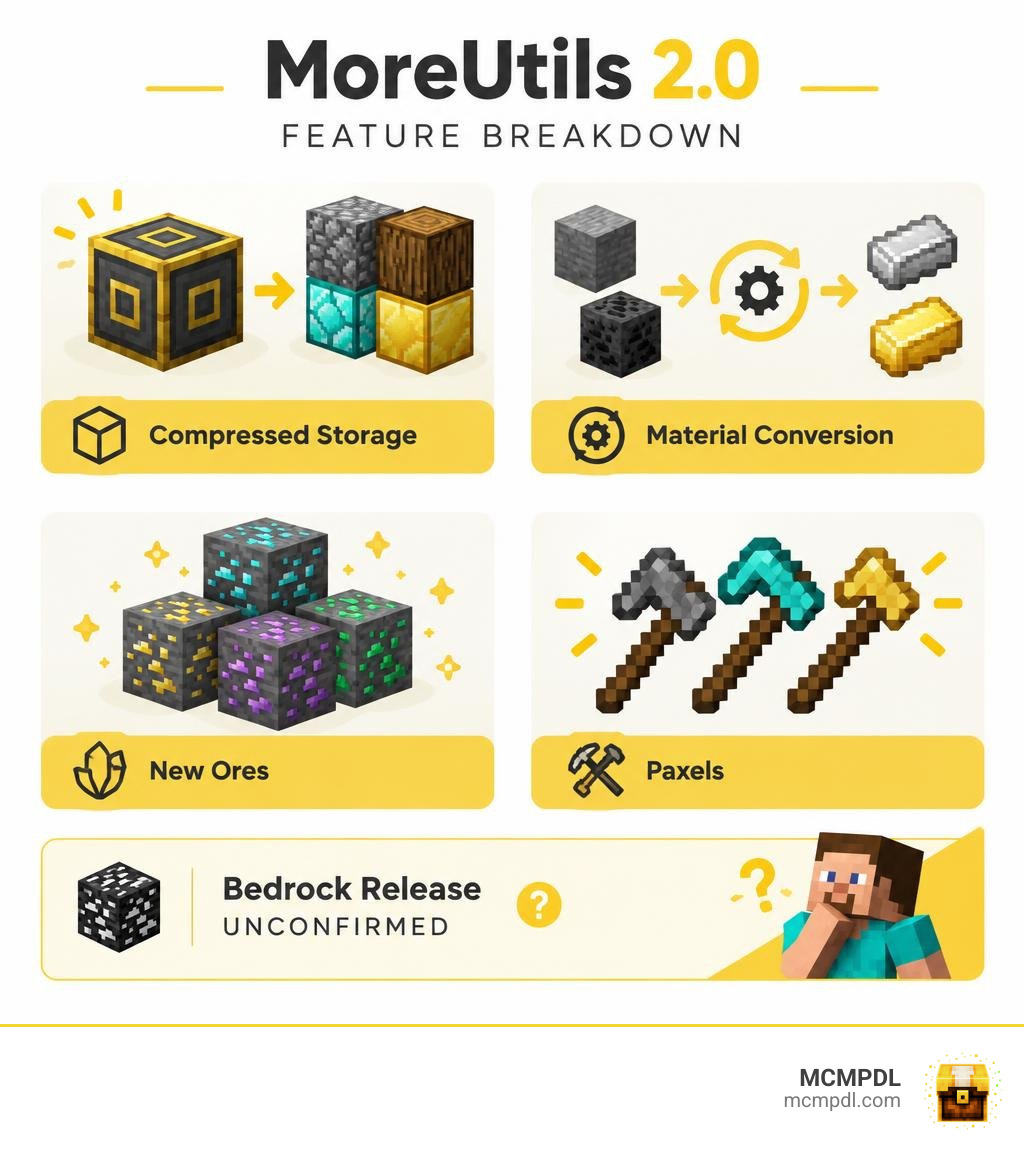
MoreUtils 2.0 adds compressed blocks, new ores, conversion recipes, and paxels that combine an axe, shovel, and pickaxe. But there is an important catch for Minecraft PE/Bedrock players: the available MoreUtils listing names Forge and NeoForge, which run on Java Edition. It does not confirm a Bedrock release.
Before downloading, check for a separate Bedrock .mcaddon or .mcpack file that supports your game version. A Java mod file will not work in Minecraft PE.
Core Features of the More Utilities 2.0 Addon for Minecraft PE/Bedrock
Managing a sprawling survival base requires reliable tools, sustainable fuel, and seamless item organization. When evaluating the core design of the More Utilities 2.0 Addon for Minecraft PE/Bedrock, the expansion focuses squarely on practical quality-of-life improvements that eliminate tedious inventory clutter without breaking vanilla game balance.
Multi-Tool Paxels and Combat Utilities
One of the standout additions in this utility suite is the Paxel. Often called the ultimate “ASP” tool (Axe, Shovel, Pickaxe), this hybrid implement combines the functionality of all three core survival tools into a single item slot. Instead of constantly toggling between your hotbar slots when excavating mixed subterranean layers of stone, dirt, and wooden supports, a single Paxel seamlessly mines through every block type at appropriate speeds.
Crafted across all standard material tiers—from wooden and iron variants up through diamond and netherite—paxels combine the respective durability pools and mining speeds of their constituent tools. In combat, paxels also double as formidable melee weapons, delivering high base damage similar to axes while retaining rapid recovery speeds. If you are looking to supplement your arsenal with specialized combat options, combining these tools alongside gear from the More Maces 2.0 Addon creates a versatile loadout for both resource gathering and boss fights. Players exploring alternate loadouts can also check out our guide on the Utility Tools Add-on for Bedrock to compare multi-tool mechanics.
Advanced Fuel Bundles and Smelting Efficiency
Smelting vast quantities of raw ore or cooking food reserves often drains standard coal reserves rapidly. The addon addresses this bottleneck by introducing condensed fuel bundles that maximize burn duration and furnace automation efficiency.
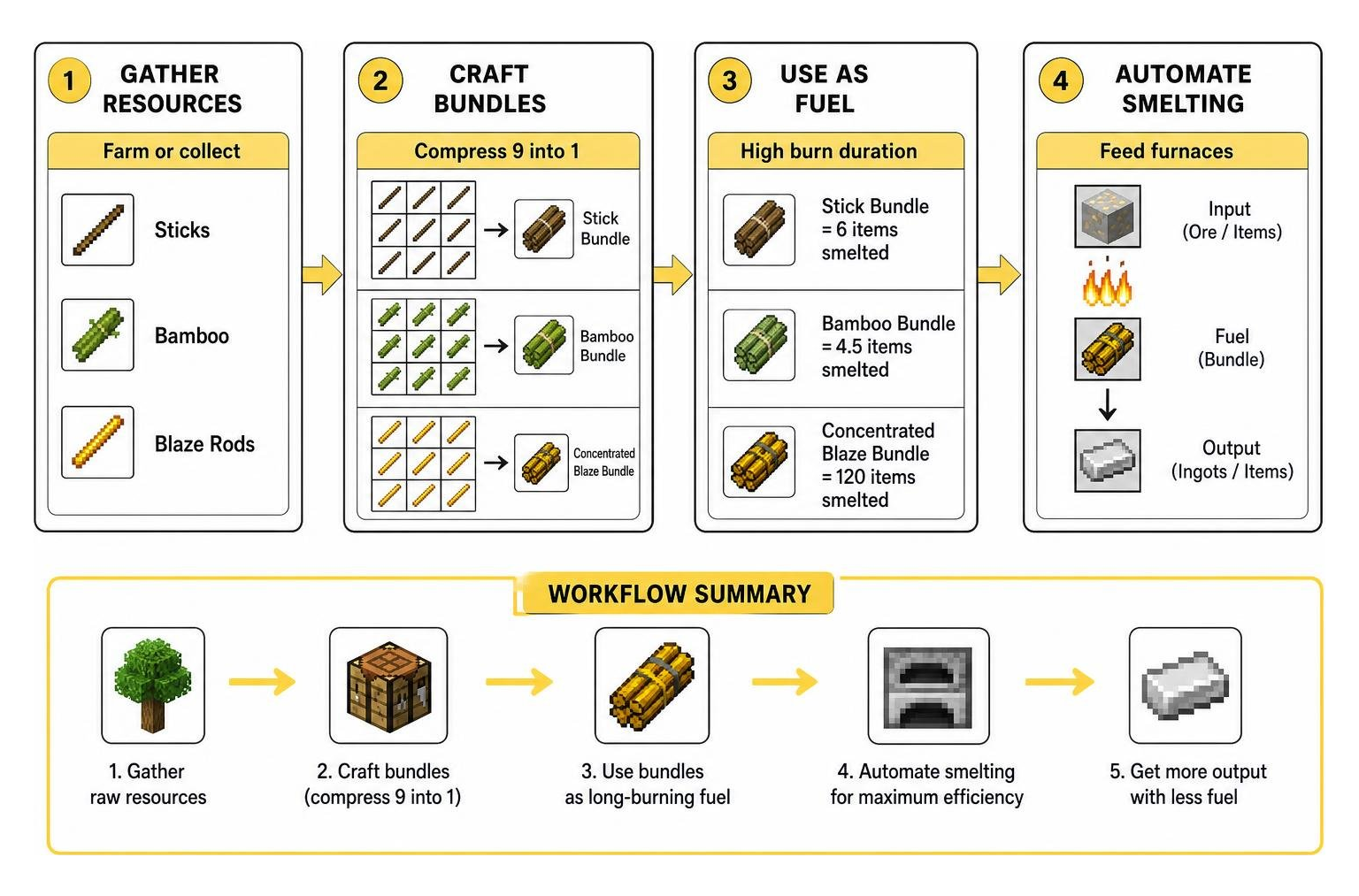
By allowing players to craft bundles of sticks, concentrated blaze rod packs, and compact bamboo bundles, the system lets you convert fast-growing farm resources into long-burning furnace fuels.
| Fuel Item | Recipe / Source Material | Base Burn Duration (Items Smelted) | Best Use Case |
|---|---|---|---|
| Single Stick (Vanilla) | Raw wood craft | 0.5 items | Emergency quick smelting |
| Single Coal / Charcoal (Vanilla) | Mining / Wood smelting | 8 items | Standard everyday furnace tasks |
| Blaze Rod (Vanilla) | Nether Blaze drop | 12 items | Mid-game batch processing |
| Stick Bundle (MoreUtils) | 9 Sticks compressed | 6 items | Early-game tree farm recycling |
| Bamboo Bundle (MoreUtils) | 9 Bamboo stalks compressed | 4.5 items | Automated bamboo farm integration |
| Concentrated Blaze Bundle | 9 Blaze Rods compressed | 120 items | Bulk super-smelter arrays |
Storage Optimization and Resource Management Upgrades
Hoarding building materials is an inevitable part of any long-term Minecraft world, but managing dozens of double chests full of cobblestone, dirt, and gravel quickly becomes a logistical nightmare.
Compressed Blocks and Reverse Conversion Recipes
To streamline warehouse logistics, MoreUtils implements a tiered block compression system. Standard building and terraforming blocks—such as Cobblestone, Dirt, Sand, Netherrack, and End Stone—can be crafted into compressed versions on a standard 3×3 crafting grid. Condensing nine blocks into a single compressed unit dramatically increases your item density.
Furthermore, reverse conversion recipes solve long-standing survival frustrations. For instance, players can uncraft standard Clay Blocks directly back into four individual Clay Balls without needing special silk touch or shovel mechanics. This feature pairs perfectly with dedicated storage setups like the Storage Addon for Bedrock and decorative expansions such as the More Blocks Addon.
Inventory Expansion and Portable Storage Compatibility
Compressed blocks drastically reduce physical footprint requirements in survival bases. A dedicated storage room that previously required thousands of item slots can be condensed down to just a fraction of that space.

When running expeditions deep underground or exploring other dimensions, pairing compressed storage with wearable packs from the Backpacks Addon for Bedrock or the multi-dimensional sorting features of the Dimensional Backpacks Addon ensures you never have to leave valuable resources behind due to full inventory slots.
Dimension-Wide Ore Generation and Material Crafting
Exploring the vast reaches of your world feels far more rewarding when each dimension offers unique mineral riches and alternate pathways for gathering critical materials.
Overworld, Nether, and End Ore Distribution
MoreUtils refreshes world generation by placing specialized ore variants across all three primary dimensions:
- Overworld Gravel Ores: Mineral deposits embedded directly inside gravel patches, providing bonus flint, iron, and coal during surface or cave excavation.
- Overworld Quartz Ore: Brings Nether Quartz variants directly into deep underground Overworld strata, enabling early redstone and comparator crafting without requiring an immediate Nether portal run.
- Nether Mineral Veins: Rich veins distributed across the Nether wastes, offering alternate sources of standard crafting metals.
- End Dimension Deposits: High-tier, End-themed mineral veins scattered throughout the outer End islands, rewarding daring explorers who navigate void bridges.
For players who enjoy expansive world overhauls, these mineral features pair smoothly with systems provided by the World Utilities Addon.
Essential Crafting Recipes and Material Recovery
Crafting in the addon follows logical vanilla conventions, keeping learning curves minimal while maximizing utility:
- Paxel Crafting: Place an Axe, Shovel, and Pickaxe of the matching tier along the top row of a crafting table, supported by two sticks in the center column.
- Compressed Blocks: Fill all 9 slots of a crafting grid with the target block (e.g., Cobblestone) to produce 1x Compressed Block. Placing the compressed block back into the grid yields all 9 base blocks.
- Reverse Clay Recovery: Place 1 Clay Block in any crafting slot to recover 4 individual Clay Balls.
- Fuel Bundling: Arrange 9 sticks or bamboo stalks in a 3×3 pattern to produce high-density fuel packs.
These straightforward crafting mechanics integrate naturally with other modular survival packs, including the Cube Utilities Addon.
Compatibility, Performance, and Installation Guide
Maintaining world stability and fluid frame rates is critical when adding new mechanics, blocks, and entity scripts to your client.
Installing the More Utilities 2.0 Addon for Minecraft PE/Bedrock Across Supported Versions
When setting up Bedrock utility packs across modern game updates (such as version 1.21 through release versions like 26.1.2), ensure you follow standard package activation procedures:
- Download the verified
.mcaddonor paired.mcpackfiles (Resource Pack and Behavior Pack). - Open the downloaded file using Minecraft PE/Bedrock on your mobile device, console, or Windows PC to trigger automatic importation.
- Open your world settings, navigate to Resource Packs, and activate the utility pack.
- Navigate to Behavior Packs and ensure the corresponding behavior file is enabled.
- In the Experiments tab, toggle on options such as Holiday Creator Features, Custom Biomes, and Beta APIs if prompted by the addon creator.
If you are pairing these utilities with comprehensive command frameworks, check out our walkthrough for the Essentials Addon to ensure proper activation order.
Stability Benchmarks and Addon Interoperability
Because utility addons rely heavily on clean JSON data definitions and lightweight custom block scripts rather than intensive ticking entities, performance impact remains minimal across mobile phones, tablets, and lower-spec devices.
Before installing any new addon or combining packs with structural tools like the World Editing Addon, we strongly recommend creating a manual backup of your world save file to safeguard your survival progress against unexpected version conflicts.
Frequently Asked Questions about More Utilities 2.0
Why Choose the More Utilities 2.0 Addon for Minecraft PE/Bedrock for Survival Worlds?
It strikes a balanced middle ground between vanilla survival and extensive modded gameplay. By consolidating multi-tool slots, optimizing chest space via compression, and offering reverse material conversions, it removes repetitive survival friction without invalidating core progression.
Does More Utilities 2.0 Add Custom Enchantments or Status Effects?
No. The addon focuses strictly on utility tools, fuel efficiency, storage compression, and ore generation. Paxels and equipment accept all standard vanilla enchantments—such as Efficiency, Unbreaking, Fortune, Silk Touch, and Mending—via anvils and enchantment tables.
How Do Conversion Recipes Work for Reverse Crafting?
Conversion recipes allow players to break down combined decorative or storage blocks back into their raw components. You simply place the crafted block back into a crafting grid to extract its original materials, such as recovering clay balls from clay blocks or raw cobblestone from compressed stone units.
Conclusion
Whether you are an ambitious survival architect building massive automated bases or a subterranean miner looking to streamline your inventory slots, utility mods deliver essential quality-of-life enhancements to your Minecraft experience. By condensing bulk materials, introducing hybrid multi-tools, and expanding ore variety across all three dimensions, these toolsets modernize resource management.
Ready to customize your survival world with the latest community creations? Explore our full collection of tested and verified packs in the curated Minecraft Bedrock Add-Ons catalog to upgrade your game today!